
Policies
The rule catalogue per module, enabling a rule, rules shipped disabled, rule details, custom rules and suppression rules.
The "Policies" page lists the rules Ctadel evaluates, module by module, and lets you enable, disable and create rules and suppress findings. This page describes what you set there and what comes from the catalogue shipped with the instance.
The "Policies" page
The "Policies" link of the sidebar opens "Policy Management". Reading requires read:policies. Eight tabs, each with its rule count: "Toxic Combination", "Cloud Config", "Secrets", "DSPM", "Host Configuration", "KSPM", "Vulnerabilities" and "Suppression Rules". Each tab offers a search, "Severity", "Category" and "Status" filters, and a table whose columns vary: "Severity", "Policy Name" or "Rule Name", "Category", "Provider", "Platform", "Status".
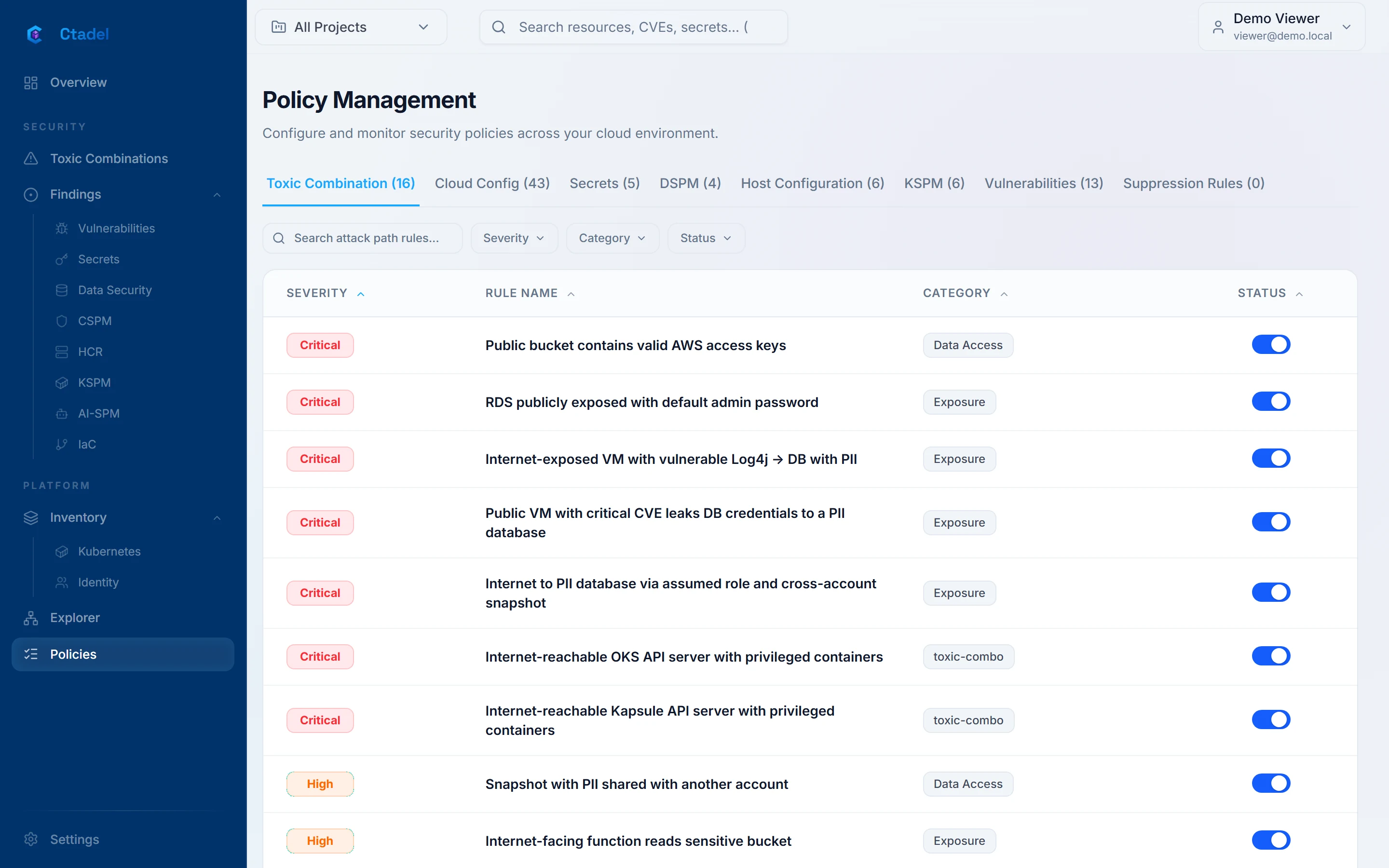
Infrastructure as Code rules have no tab of their own: they share the "Cloud Config" catalogue. Detection on activity logs (CDR) is under internal validation and does not appear for customers.
Enabling or disabling a rule
The switch of the "Status" column ("Toggle policy") requires update:policies. The choice is recorded as yours: an update of the instance re-applies the catalogue without touching a rule you disabled or re-enabled. A disabled rule shows "Inactive" and is no longer evaluated at the next scan.
On "Cloud Config", the severity of a rule can be changed in the "Severity" column; the rule is then marked "CUSTOM" so that the catalogue does not restore the original value.
On "Vulnerabilities", each CVE of the catalogue carries an "Active" or "Ignored" state and a "Disable" or "Enable" button: a disabled CVE is no longer matched against installed packages.
Rules shipped disabled
Part of the catalogue ships with the "Inactive" status. The reason is recorded in the rule's description, in English, after the word "Disabled:". The list does not show it, but the tab's search covers the description. Enabling one of these rules produces no finding.
When the instance is updated, a rule removed from the catalogue is disabled automatically but kept, so that its past findings keep their reference.
Rule details
The detail panel of a finding shows the content of its rule: "Why it matters" (long description, impact, attack scenario), "Remediation" (numbered steps, then "Operational commands" with "Audit current state" and "Rollback the fix"), "References" and "Frameworks". Depending on the type, the rotation procedure of a secret, the attack chain and the "Real-world incident:" of a toxic combination, or the governance requirements of a DSPM rule are added. Without guidance, the panel says "No remediation guidance available."
On "Secrets" and "DSPM", the "Show" button of the "Pattern" column reveals the detection pattern of the rule.
Custom rules
The "Create Rule" button exists on four tabs: "Toxic Combination", "Cloud Config", "Secrets" and "DSPM" (permission create:policies). The form holds "Rule Information" ("Rule Name", "Description", "Severity", "Category", "Cloud Providers", "Compliance Frameworks", "Remediation"), then depending on the type:
- "Query Builder" for a cloud configuration or toxic combination rule: you pick a resource type, its conditions and its relationships; "Test" runs the query on your graph and answers "Query valid - N matching resource(s)".
- "Regex Pattern" for a secret or sensitive data rule, with a "Test String". A pattern Ctadel does not support is refused before saving.
A custom rule carries the "CUSTOM" badge and can be deleted (permission delete:policies): "This action is permanent. The equivalent default rule (if it exists) will be re-enabled."
The Sapper's proposals
The Sapper assistant searches the graph for attack paths the catalogue does not describe. Its proposals land on the "Toxic Combinations" page, "Sapper" block, with the "Verified path", the "Evidence" and the "Generalised rule (Cypher)". "Accept as a rule" creates a custom toxic combination rule, keyed SAPPER- followed by eight characters, category sapper, evaluated at once on the starting resource and then at every scan. "Reject" archives the proposal with the reason entered. The Sapper is only offered to people whose scope covers every project. Details in Assistants.
Suppression rules
The "Suppression Rules" tab (reading read:ignore_rules, changing manage:ignore_rules) hides findings automatically: "Findings matching this rule will be automatically set to IGNORED". The "Create Suppression Rule" form holds:
- "Rule Information": "Rule Name", "Finding Type", "Suppress severity at or below", "Reason / Justification", "Expiration" ("30 days", "90 days", "6 months", "1 year", "Never").
- "Resource Scope": a scope built as a query on the graph; "Test Scope" gives the number of affected resources and must be run before saving.
- "Rule Filters": "Specific Rules" and "Projects", empty to cover everything.
A rule with no scope, no rule and no project asks for an explicit confirmation: it suppresses every open finding of the chosen type. Rules apply each time findings arrive; "Apply retroactively" applies them to findings already present. An expired suppression reopens the findings it hid, through an hourly check. Deleting it has the same effect: "Findings previously hidden by this rule will become visible again."
Limitations
- The reason of a rule shipped disabled is only readable in the description, in English; the interface does not prevent enabling such a rule, which will produce nothing.
- No custom rule for "Host Configuration", "KSPM" or "Vulnerabilities"; on these tabs, only the status and the severity can be set.
- Editing a catalogue rule is limited to its status and its severity; its query, description and remediation cannot be edited.
- The query builder and the pattern editor rely on the schema of your graph; a custom rule is not checked beyond the test you run.
- Custom secret and sensitive data rules follow the same pattern syntax as the catalogue: a pattern outside it is refused.
- No export or import of the catalogue, and no history of activation changes on this page; the audit log keeps the change requests.