
Infrastructure as code
Scanning Terraform files, Kubernetes manifests and Dockerfiles on every push and pull request, the PR comment and status, drift between code and cloud, and linking a cloud resource to its Terraform line.
The infrastructure as code module scans the connected Git repositories on every push and every pull request, publishes the result in the pull request, then reconciles what the code declares with what the cloud runs. The "Infrastructure as Code" page and the report of each scan present the result.
Triggers
A Git integration (GitHub App or GitLab group, see Connect a Git repository) delivers webhooks to the instance. A push or pull_request event (opened, new commit, reopened) on GitHub, a "Push Hook" or "Merge Request Hook" on GitLab, start a scan when the integration allows it: "Scan on every push" and "Scan every pull request" are set in "Settings", "Git Integrations" section, "Edit Git integration". The three families ("Infrastructure as Code", "Secrets", "Dependencies (SCA)") are enabled one by one.
Ctadel clones the commit, scans it for the three families and deletes the clone at the end. A long scan (a monorepo) stays in progress without being started twice.
What is scanned
| Files | Recognition | Reading |
|---|---|---|
| Terraform | *.tf and *.tf.json | resource blocks are read; variables are resolved from terraform.tfvars, *.tfvars and *.tfvars.json. Each resource is also written to the repository's inventory (type, address, file, line), which drives the code-to-cloud link |
| Kubernetes manifests | *.yaml and *.yml holding kind and apiVersion | The pod spec is extracted from Deployment, StatefulSet, DaemonSet, Job, CronJob and Pod; the checks cover the containers and their security context, inheriting from the pod |
| Dockerfile | Files named Dockerfile or *.Dockerfile | Instructions are read stage by stage; the checks cover the base image (latest or no tag), the USER instruction, ADD instead of COPY and the other CIS Docker practices |
Terraform rules cover the aws, azurerm, google, scaleway, ovh and outscale providers. A few rules ship disabled by default; the reason is given in their description.
A file over 10 MB is not read. A symbolic link is not followed: a .tf pointing outside the clone would not be read as Terraform. A Terraform file that does not parse, or an invalid YAML (a Helm template, a Kustomize overlay), is counted as not analysed.
The .ctadel.yaml file
At the repository root, a .ctadel.yaml file declares what the team accepts and where to file the repository:
version: 1
folder: Production/Europe/France
ignores:
  - rule: IAC-AWS-TF-006
    paths:
      - "modules/bastion/**"
    resources:
      - aws_security_group.bastion
    reason: "Bastion SSH filtered by the upstream firewall, reviewed on 3 March"
expires: "2027-03-01"rule: the exact key, or a prefix followed by*.pathsandresources: optional; path patterns and resource addresses. An entry with neither covers the whole rule.reason: required, at least 10 characters. A silent suppression is not accepted.expires: optional; an expired entry is ignored.folder: optional; the folder of the interface the repository is filed under, created when missing. See Projects and folders.
A finding covered by an entry is stored with status IGNORED, the rule and the reason, and counts neither for the pull request status nor for the comment. The same entries cover the repository's secrets. When the file does not parse, the scan goes on without suppression and the report shows "Could not load .ctadel.yaml": "Suppression rules are not applied for this scan. Fix the file in the repository and trigger a new scan."
Pull request comment and status
Each scan of a pull request produces:
- a comment listing the findings by severity with file and line, and a link to the
/gitscan/<id>report; - a commit status per family:
ctadel/iacandctadel/secretson GitHub,ctadel/iac-scanon GitLab. Your branch protection can require that status.
The status is "failure" when "Block PR on failure" is checked for the family and a finding reaches the "Block if findings ≥" threshold (severity CRITICAL, HIGH, MEDIUM or LOW). An unrecognised threshold blocks on any finding. Without blocking, the status is always "success" and the comment stays informative.
A scan of a branch or a pull request is judged on its own: it does not close the default branch's findings, does not rewrite the inventory and does not alert the notification channels. When a pull request is closed without being merged, the findings it introduced are closed with the reason "pull request closed without merge".
Finding history
On the default branch, a finding that no longer appears in the next scan moves to RESOLVED; a finding already seen keeps its first detection date. Each status change is written to the finding's history, visible in the "History" tab of the detail panel. Possible statuses are OPEN, IGNORED and RESOLVED.
Drift between code and cloud
Some Terraform rules have a counterpart in the cloud configuration catalogue: the same property, read on the deployed resource. These pairs qualify a finding:
| Finding | Value | Meaning |
|---|---|---|
| Cloud configuration | "Cloud only" | No paired code rule applies, or the resource is not managed by known code |
| Cloud configuration and IaC | "Code & Cloud" | The same misconfiguration is in the code and in the cloud: fixing the code is enough |
| Cloud configuration | "DRIFT" | The resource is declared by known code (see the link below), the code is sound, but the cloud has the misconfiguration: someone changed the resource outside the code |
The "Source" column of the "Cloud configuration" page (see Cloud configuration) shows this value and a "Source" filter selects it. The reconciliation is recomputed after each cloud evaluation and after each repository scan. It matches resources by name: the Terraform address must equal the cloud resource name, or be its last segment.
Pairs are declared one by one and only when the cloud rule tests the same property, with the same polarity, on the same resource. Some Terraform rules have no counterpart; a finding of those rules has no drift status.
Linking a cloud resource to its Terraform line
For a cloud resource to be linked to the code that declares it, Ctadel writes a ctadel:id tag on the resource in the code, then reads it back from the cloud:
- After the first scan of a GitHub repository, Ctadel opens a tagging pull request on a
ctadel/iac-tagging-<date>branch. It addsctadel:id = "<identifier>"to thetagsblock (orlabelsfor Google Cloud) of the resources whose Terraform schema accepts that field. A type absent from the list of taggable types is left untouched. The identifier is stable: reopening the pull request on already tagged code yields an empty diff. - You review and merge that pull request, then apply your Terraform.
- The cloud inventory reads the tag on each resource; Ctadel looks up the identifier's coordinates (repository, address, file, line) and writes them on the resource in the graph. Each resource declared in code also has its own
IacResourcenode in the graph, created from the repository's inventory, and aDEPLOYED_ASrelationship joins it to the cloud resource as soon as both exist. - Child resources that carry no tag (a security group rule, a route) inherit their parent's link.
The tagging pull request needs the contents and pull_requests write permissions of the GitHub App. When the installation lacks them, "Settings" shows a banner asking to re-authorize Ctadel on the organization "to enable automatic PR tagging", with a "Review permissions on GitHub" button. Only one tagging pull request is open at a time per repository; if you close it without merging, no other is opened for 30 days; after a merge, a follow-up pull request is opened when new resources appear in the code.
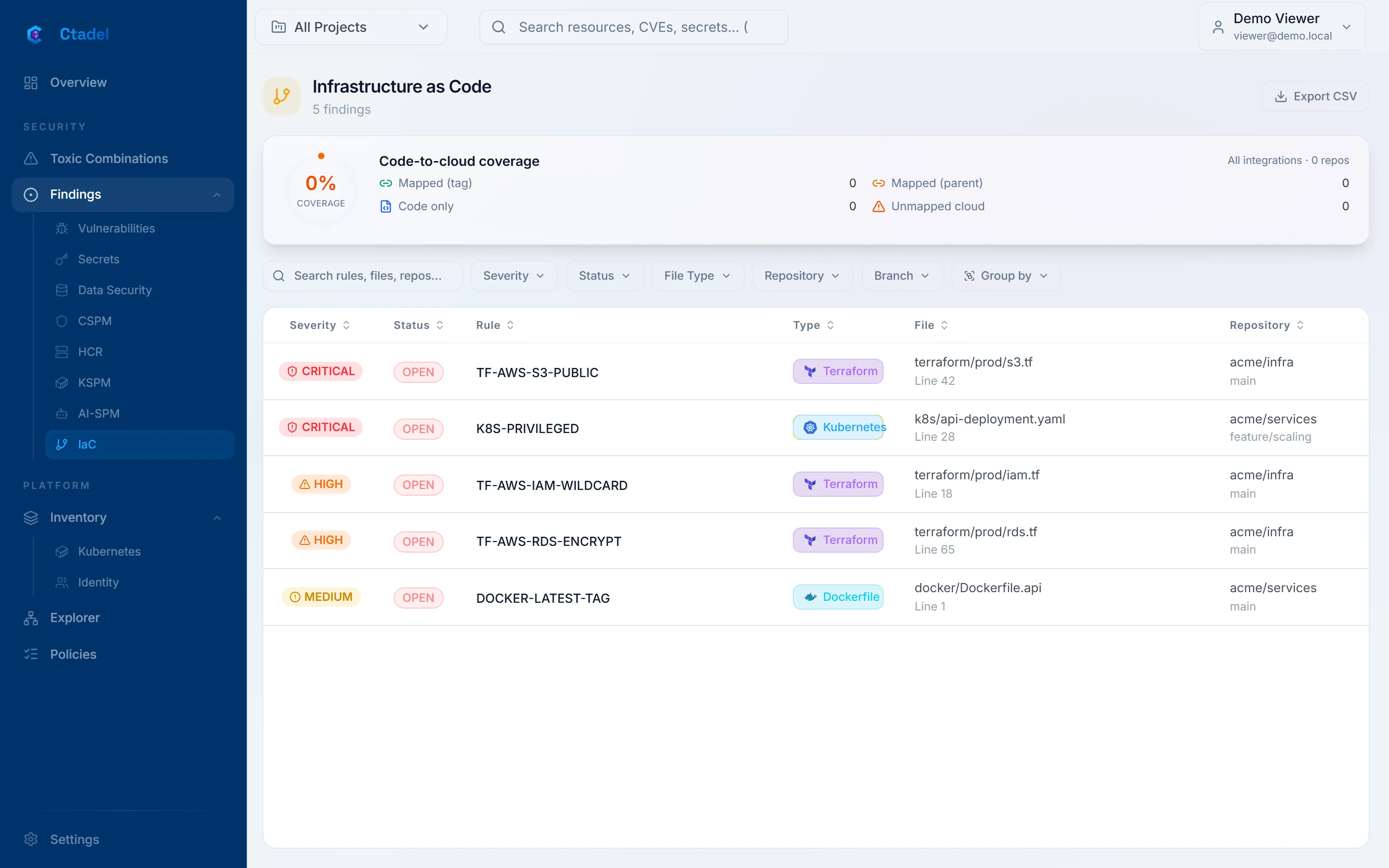
The "Code-to-cloud coverage" card at the top of the "Infrastructure as Code" page counts the "Mapped (tag)", "Mapped (parent)", "Code only" (declared but not deployed) and "Unmapped cloud" resources, and gives the share of the whole that can be attributed to a file and a line. The DEPLOYED_AS relationships are visible in the explorer.
The pages
The "Infrastructure as Code" page ("IaC" entry of the menu) lists the findings of every repository with the columns "Severity", "Status", "Rule", "Type" (file type), "File" and "Repository". Filters are "Severity", "Status", "File Type", "Repository" and "Branch"; grouping uses the same axes; "Export CSV" exports the selection. A click opens the detail panel ("Overview", "Remediation", "History" tabs).
The "Scan report" (/gitscan/<id>, the link of the pull request comment) shows one scan: repository, branch, pull request number, number of files scanned, then three tabs "IaC", "Secrets" and "Vulnerabilities" with the findings that scan saw. Old /iac/scan/<id> links redirect there.
Limits
- Some Terraform rules ship disabled; their description in "Policies" says why. Among them, rules whose setting is no longer declared where they read it: the inline
versioning,loggingand encryption blocks of S3 buckets (AWS provider 4 and later declare them in separate resources), the NSG association onazurerm_subnet, the inline auditing policy ofazurerm_mssql_server, the DNSSEC ofovh_domain_zone. - Terraform variables are resolved from
tfvarsfiles only;locals, module outputs and data sources are not. A value that depends on them is not evaluated. - Helm templates and Kustomize overlays are not valid YAML and are not scanned. Only rendered manifests are.
- A file over 10 MB is not read.
- Code-cloud pairs exist for AWS, Azure and Google Cloud; Scaleway, OVHcloud and OUTSCALE rules have none, hence no drift status.
- The tagging pull request exists for GitHub only; a GitLab repository gets the comment and the status but no automatic tagging. Terraform types that carry their tags in another shape (
aws_autoscaling_group,google_container_cluster,google_sql_database_instance) are not tagged. - The drift status depends on the code-to-cloud link: a resource without it is never marked "DRIFT".
- The "Code & Cloud" and "Code only" labels are defined for the "Infrastructure as Code" page, but the list shows no source column; the drift status is read on the "Cloud configuration" page.