
Inventory and explorer
The Inventory page (families, filters, search), the graph explorer (Find, That, Where queries, templates, graph and table views, limit, saving as a policy, query assistant) and the Schema page.
Three pages give access to the security graph without writing a query: "Inventory" lists the resources, the "Security Graph" explorer composes queries from the schema, and the "Security Graph Schema" describes what the graph holds. The model itself is described in Security graph.
The Inventory page
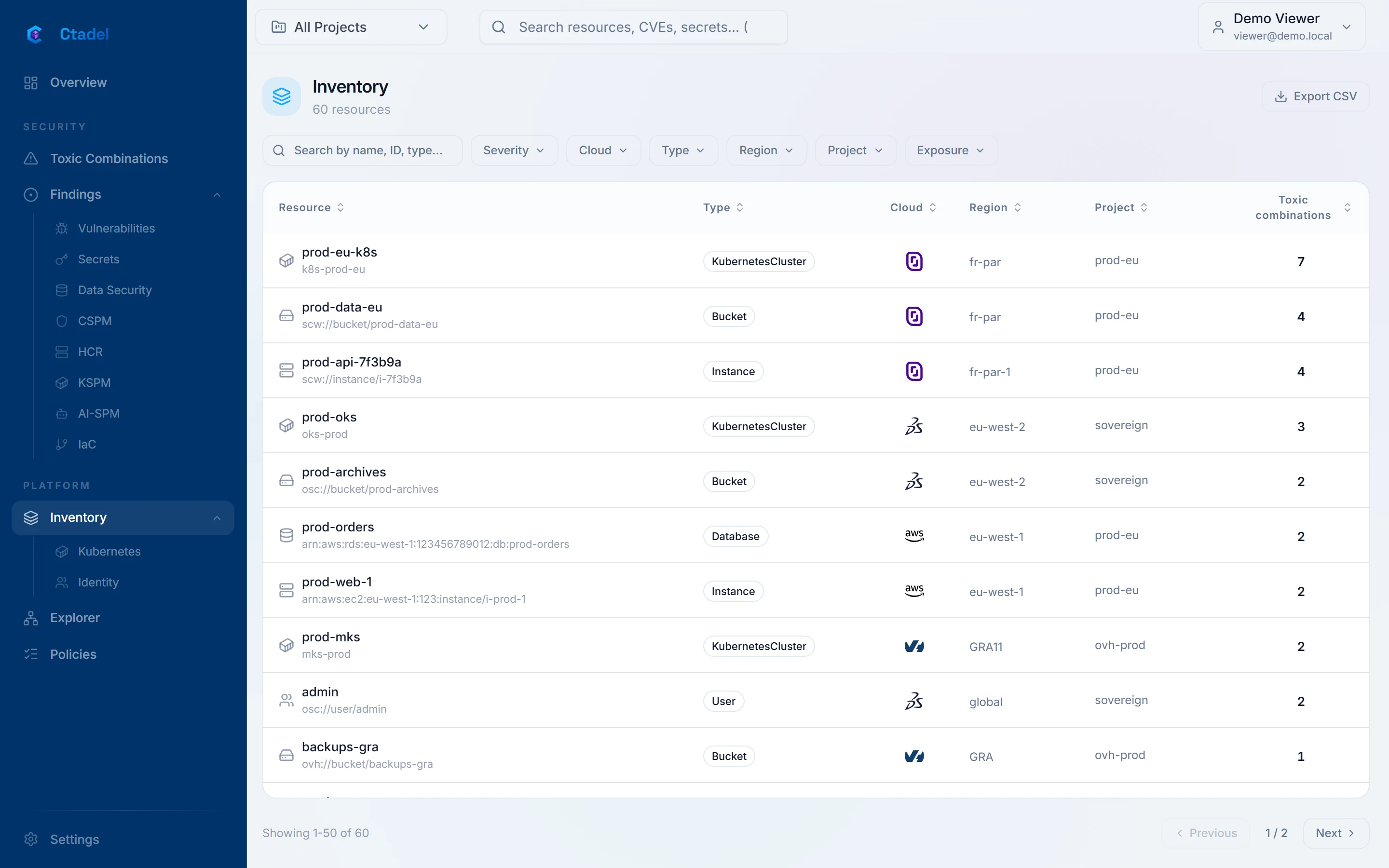
The "Inventory" page ("Inventory" entry of the menu) reads the graph and lists every cloud resource that carries an identifier, except the objects that are not resources: findings, CVEs, secrets, classified data, container images, Kubernetes nodes and workloads, projects. Kubernetes workloads have their own Kubernetes page.
| Column | Content |
|---|---|
| "Resource" | The name, or the identifier when there is none |
| "Type" | The graph node type (Instance, Bucket, Database, SecurityGroup and so on) |
| "Cloud" | The provider |
| "Region" | The region, or global |
| "Project" | The cloud project or account |
| "Toxic combinations" | The number of findings, secrets and CVEs attached to the resource, with the highest severity |
Filters are "Severity" (the highest severity carried by the resource), "Cloud", "Type", "Region", "Project" and "Exposure" ("Public": the cloud's inventory reports the resource as public; "Has issues": it carries at least one finding). The "Search by name, ID, type..." field filters on those three values. "Export CSV" exports the selection. Clicking a row opens the resource's panel, with its properties, relationships and findings.
The page loads at most 1,000 resources, ordered by severity then by number of findings; the counter at the top gives the total found by the same filters. The active project chosen in the header applies when no "Project" filter is set.
The explorer
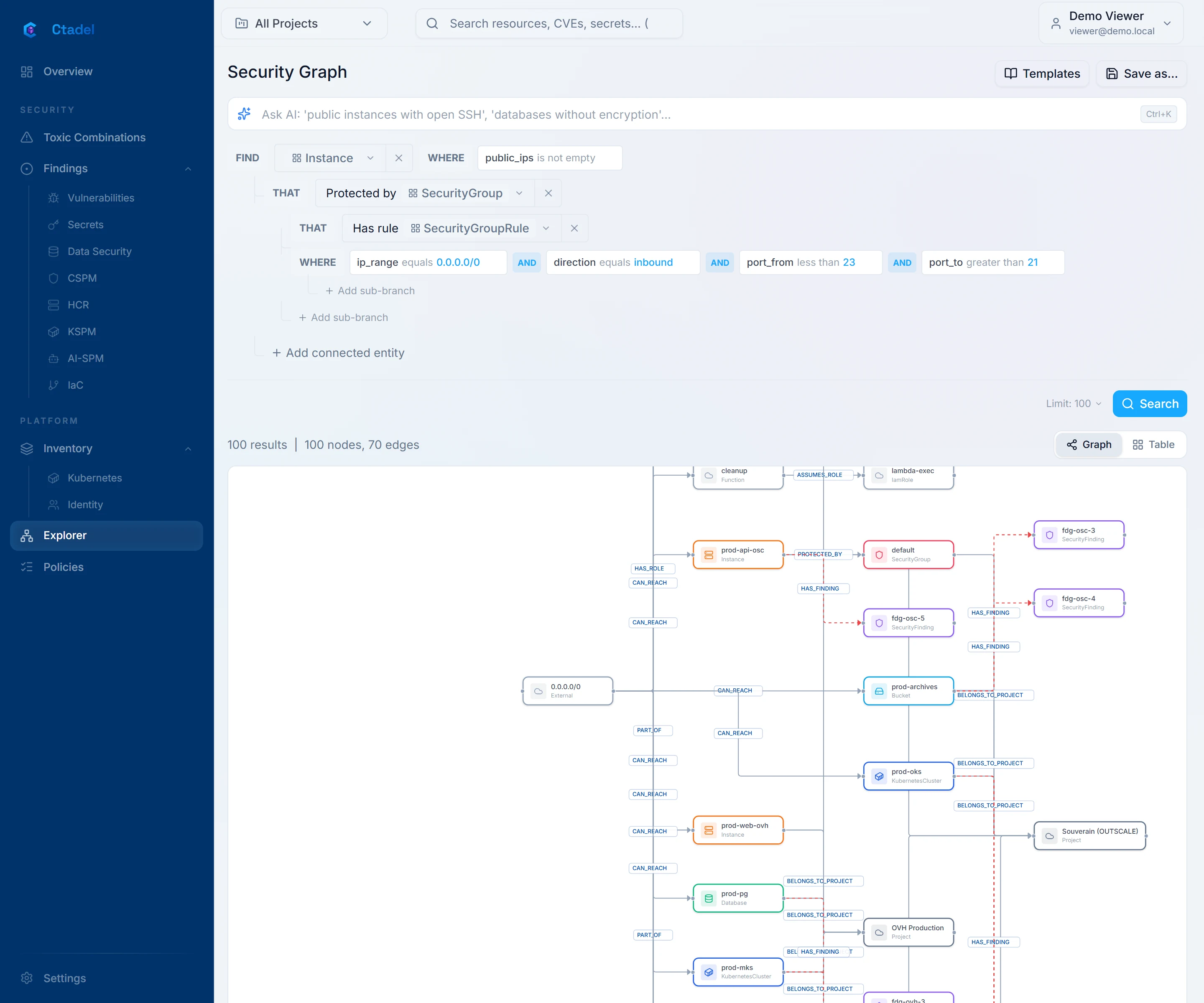
The "Security Graph" page ("Explorer" entry of the menu) composes a query in three parts, without writing a line:
- "Find": the starting resource type, picked from a list grouped by schema category ("Select entity...", "Search resources..." field).
- "Where": filters on the properties of that type ("+ Add filter"). Each filter has a "Property", an "Operator" and a "Value". Operators are equals, not equals, contains, does not contain, starts with, ends with, greater than, less than, is empty, is not empty, in list; those offered depend on the property's type. Filters combine with
ANDorOR("Toggle to …"). - "That": connected entities ("Add connected entity"), picked among the types reachable in one hop from the current type, by relationship and in either direction, according to the graph's real schema. A connected entity accepts filters and connected entities in turn; "Add sub-branch" opens a parallel branch. A query holds at most 10 steps.
"Limit: N" sets the number of results (25, 50, 100, 200 or 500; 100 by default). "Search" runs the query on the graph, read-only; it is interrupted after 15 seconds.
The result is shown as "Graph" (the nodes and their relationships) or "Table" (one row per result, with the type, identifier, name and region of each entity; "Filter results..." field, "Export CSV"). The counter reads "N results" and "N nodes, N edges", and the query that ran on the graph is displayed.
Templates
"Templates" opens the "Query Templates", pre-built security queries grouped in six categories: exposure and attack surface, identity and access, encryption and secrets, Kubernetes and containers, data (DSPM), attack paths. Each template has a name, a description and a severity; "Load" places it in the builder, where you adapt it before searching.
Saving a query as a policy
"Save as..." then "Save as CSPM Policy" turns the current query into a custom cloud configuration rule: "Policy Name", "Description", "Severity", "Category" ("Custom", "Compute", "Storage", "Network", "IAM", "Kubernetes", "Encryption", "Data") and "Remediation". The rule gets a cspm_custom_… key, is evaluated on every scan across all projects, and its results land among the cloud configuration findings. The right to create policies is required. The confirmation reads: "Policy saved successfully (key). It will be evaluated on the next scan."
Query assistant
The "Ask AI: 'public instances with open SSH', 'databases without encryption'..." field translates a natural-language request into a builder query. The model receives the graph schema and a summary of the active project's posture (open findings by severity, most frequent rules, 7-day trend, incidents), then returns a query that the page loads into the builder; you review it and run the search yourself. Later requests refine the previous one ("Refine: 'only critical ones', 'add region filter'..."); the conversation keeps the last 20 messages and "Clear" empties it. The language model is the same as the assistants use, served in Europe by Scaleway. When no valid query comes out, the page says "No valid query generated. Try rephrasing your request."
The Schema page
The "Security Graph Schema" page (/schema) shows the data model as Ctadel writes it: node types with their properties and category, relationship types with their ends, and the number of instances of each in your graph. The list of types and properties comes from Ctadel's model; the counts come from your graph. Clicking a type opens its "Properties", its "Relationships" ("Outgoing", "Incoming") and its "Instances" count. Without a scan, the page reads "No schema data available".
Scope
All these pages respect the user's scope, enforced by Ctadel: a user whose role is limited to projects sees only the resources of their active project, whatever identifiers the browser sends; a user with no project sees nothing. A global user can narrow the view with the header's project filter.
Limits
- The inventory loads at most 1,000 resources; beyond that, only the counter says how many match. Filters and search apply to what is loaded.
- The inventory's "Toxic combinations" column counts every finding, secret and CVE attached to the resource, not only toxic chains.
- An explorer query is limited to 500 results and 10 steps; it is interrupted after 15 seconds. The properties shown in the table are the type, identifier, name, region, state, cloud and project of each entity.
- The names and descriptions of the query templates and of their categories are written in English and are not translated.
- The query assistant produces a builder query, not a free-form query; it only knows the schema's types and relationships, and may fail to translate a request. It is available only when the instance operator has configured the model service key.
- A policy saved from the explorer is evaluated across all projects, without the project filter that applied to the search.
- The Schema page describes the types Ctadel can write; a type known to the model but absent from your graph appears with zero instances.