
Hosts (HCR)
The Linux and Windows hardening checks evaluated on a disk copy, the benchmarks followed, what a disk copy lets Ctadel read, what is marked SKIPPED and why, and the “Host Configuration Review” page.
The Hosts module checks the configuration of your Linux and Windows machines against hardening benchmarks, without an agent and without connecting to the machine: it reads a copy of its disk, created in your cloud account for the duration of the scan. One finding is raised per failed check and per host.
The disk copy
For each volume recorded by the inventory, Ctadel's disk scanner proceeds as follows in your account, on the six clouds (AWS, Azure, Google Cloud, Scaleway, OVHcloud, OUTSCALE):
- It creates a snapshot of the volume, then a volume from that snapshot.
- It starts a small scanner machine, tagged Ctadel, and attaches that volume to it. At start-up it installs the tools it needs to read the disk. Its network is described in Scanner settings.
- It connects over SSH and mounts the copy read-only, without replaying the filesystem journal. It looks for the system partition, the one holding
/etc/os-releaseor a Windows registry; boot and EFI partitions are set aside, and a partition with no readable filesystem (LUKS, LVM or RAID member, swap) is skipped. A disk with no system partition is treated as a data disk, read by the Data and Secrets modules but not by this one. - It evaluates the checks, then detaches the volume and deletes the machine, the volume and the snapshot. Deletion happens on every path, including after an error or an interruption of the scan. A scan gets 45 minutes. Once an hour and per account, Ctadel also removes Ctadel-tagged resources older than two hours that an interrupted scan may have left behind.
The system type is inferred from the copy: NTFS means Windows, anything else Linux; only the rules of the detected platform (or of platform "Any") are evaluated. Immutable and container operating systems (Container-Optimized OS, Flatcar, Bottlerocket) are not checked: their configuration is not in the files the rules read. Volumes behind a Kubernetes PersistentVolumeClaim go through the same path.
Benchmarks and check families
The rules reference the CIS Benchmarks (Red Hat Enterprise Linux, Ubuntu, Windows, Docker, Azure), the DISA STIGs and OWASP. Distribution variants (Amazon Linux 2023, Red Hat Enterprise Linux 8 and 9, Oracle Linux 8 and 9, Ubuntu 20.04, 22.04 and 24.04, SUSE) carry the same check under the name of that distribution's benchmark; they are only evaluated on the distribution they name, read from /etc/os-release (ID_LIKE counts, so a Red Hat rule applies to Rocky and Alma).
| Platform | Categories |
|---|---|
| Linux | SSH, kernel (sysctl, modules), filesystem (permissions, owners, mount options, SUID, world-writable files), packages (present or forbidden), services (enabled or disabled at boot), passwords and accounts, authentication (PAM, sudo), audit (auditd), boot (GRUB), patching (end of support), firewall, encryption, SELinux, network, Docker, kubelet of Kubernetes nodes |
| Windows | Network security (SMB, LDAP, NTLM), authentication and credential protection, services, Defender, autoplay, remote management (WinRM, RDP), audit, firewall, password policy, virtualization-based security, installer, logging and event logs, exploit protection, encryption, domain, printing, sandbox, browser |
Each rule carries a severity, a category, a remediation, and for most of them a manual audit command to verify the state on the machine. Rules that name a distribution, a Windows server role (domain controller, member server, workstation, read from the SYSTEM hive) or an exclusion condition (a container runtime present makes IP forwarding legitimate) are only evaluated where they apply; elsewhere they answer SKIPPED with the reason. The "Policies" page lets you enable or disable each rule; see Policies.
What a disk copy lets Ctadel read
A disk copy carries the whole boot configuration, but not the in-memory state. The table says what each family of checks reads on the copy.
| Check | Read on the copy |
|---|---|
| Configuration value | The file named by the rule; for sshd_config, the configuration sshd applies (first value wins, Include files, Match blocks left out, OpenSSH defaults). A file absent from the disk gives SKIPPED: the software is not installed. |
| Kernel parameters | The sysctl configuration files, in their order of application |
| Kernel modules | The modprobe.d files (install, blacklist) and modules-load.d |
| Services | The state at boot from systemd's *.wants links and masked units, aliases included. The finding says "enabled at boot", not "running". |
| Mount options | /etc/fstab and systemd mount units |
| Packages | The copy's dpkg, apk or rpm database |
| Audit rules | The auditd rule files loaded at boot |
| Permissions, owners, content, existence, file search, SUID, world-writable | The copy's filesystem |
| Accounts and password policy | /etc/passwd, /etc/shadow, /etc/login.defs, PAM |
| Docker, kubelet | daemon.json and the KubeletConfiguration file at the kubeadm, EKS, AKS and GKE locations; without a kubelet file the disk is not a node: SKIPPED |
| End of support | /etc/os-release compared with the end-of-support calendar published by endoflife.date, which Ctadel refreshes before each scan |
| Windows registry | The SOFTWARE, SYSTEM, SAM and SECURITY hives are copied, repaired (transaction logs applied) and read; an unconfigured value takes the Windows default when the rule gives it, and fails otherwise |
| Windows services | The Start value in the SYSTEM hive; a service that is not installed satisfies "disabled", as CIS intends |
| Windows firewall | Group Policy (SOFTWARE\Policies) first, then the local store |
| Windows account policy | The F structure of SAM\Domains\Account (password length and complexity, lockout) and the state of the Administrator and Guest accounts; on a domain controller the policy lives in Active Directory: SKIPPED |
| Windows event logs | Size and retention in the registry, Group Policy then the service key |
What is kept and shown
Only failed checks become findings: host, rule, observed value, expected value, message, file concerned. A check that passes again closes the finding at the next scan. PASS and SKIPPED results are not stored and do not appear in the application. Each new failure triggers a hosts notification; see Notifications.
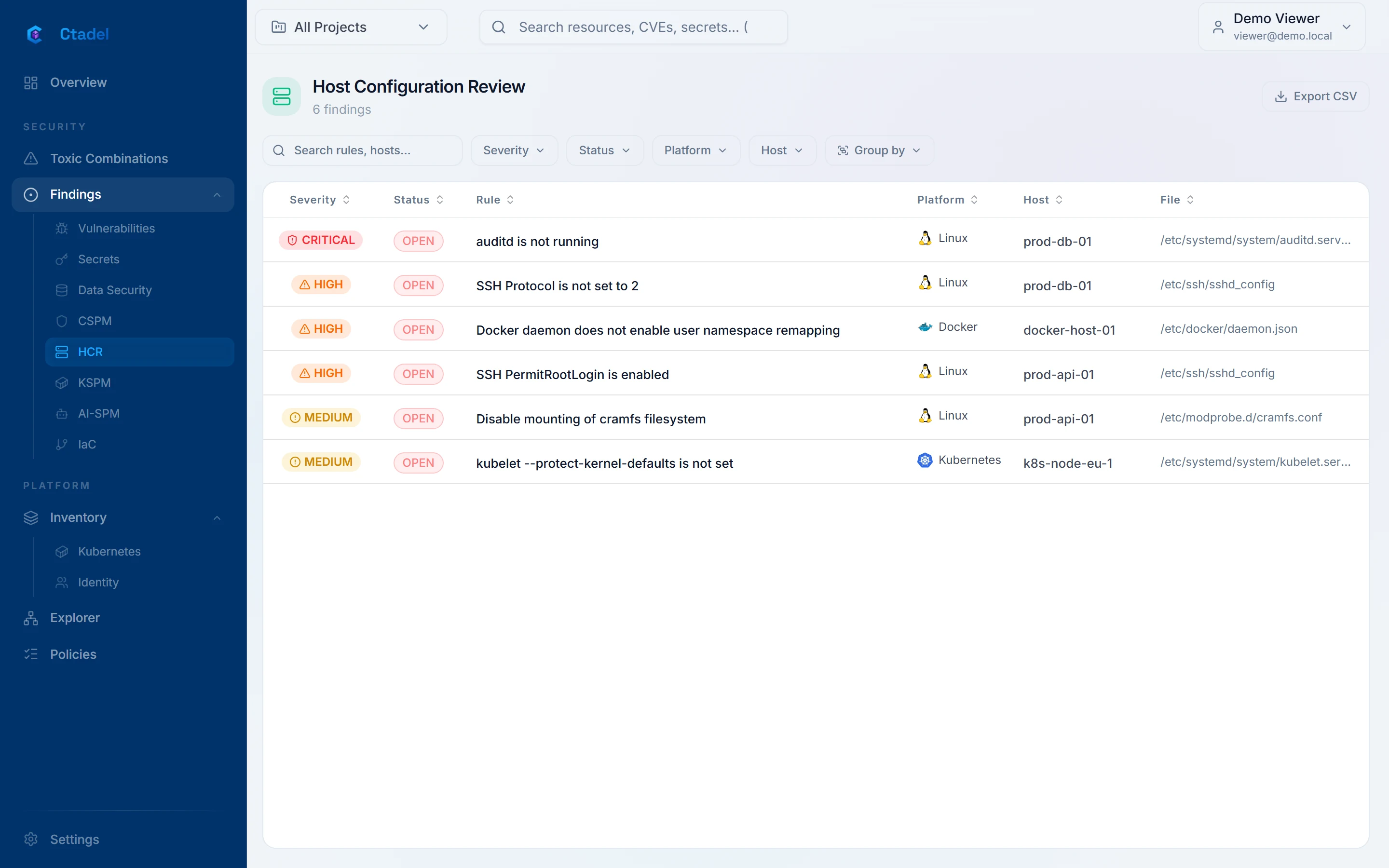
The "Host Configuration Review" page (address /hcr) lists the findings of the active project, open and closed, sorted by severity then by date, with the columns "Severity", "Status", "Rule", "Platform", "Host" and "File". Filters cover "Severity", "Status", "Platform" and "Host"; grouping covers the same fields. The "Export CSV" button exports the filtered list. The page shows at most 2,000 findings. Clicking a row opens the detail panel, described in Reading a finding.
Disabled rules
Part of the catalogue ships disabled; the reason is written in the rule's description after Disabled:. Among them are the checks that need the running machine rather than its disk (a command run on the host, the Windows user rights assignments and advanced audit policy); enabled, they answer SKIPPED on every host.
Limits
- The module reads a disk copy, not the machine. It sees neither processes, nor network connections, nor the services actually running: "active" is read as "enabled at boot". A service started by hand, or stopped after boot, is not seen.
- Marked
SKIPPEDand therefore invisible in the application: rules that do not apply to the distribution or server role; checks whose file is not on the disk (software not installed); kubelet checks on a disk without a kubelet; the account policy of a domain controller; an unreadable Windows hive. Windows user rights assignments and the advanced audit policy are not read at all. - An encrypted disk (LUKS, BitLocker) cannot be mounted: no check is evaluated. An LVM volume is only read when the scanner machine can activate it.
- Immutable systems (Container-Optimized OS, Flatcar, Bottlerocket) and data disks are not checked.
PASSresults are not kept: the application cannot prove that a check is satisfied, only that it is no longer failing.- The end-of-support rules depend on the endoflife.date calendar available at scan time; a distribution absent from the calendar is not judged.
- Distribution variants only cover the releases named above; other distributions are judged by the generic rules.
- The scan creates a snapshot, a volume and a machine in your account, billed for the duration of the scan. If the connected account lacks the matching rights, no disk is read.