
Sensitive data (DSPM)
The identifiers searched for in buckets, PostgreSQL databases, disk copies and function code, the formats read, sampling, what Ctadel keeps and the “Data Security” page.
The sensitive data module searches the content of your storage resources for identifiers with a known format: card numbers, IBANs, social security numbers, healthcare identifiers. It reads buckets, a temporary copy of your PostgreSQL databases, disk copies and the code of serverless functions, and raises one finding per rule and location. It never keeps the value it found, only a masked excerpt.
What is searched for
Each rule is a regular expression taken from a published standard (RFC, ISO, national authority, card issuer specification), cited in the rule's description. When the identifier carries a check digit, a validator verifies it (Luhn for cards, modulo 97 for IBANs, and so on): a digit run that looks like the identifier but fails the check is not reported. Identifiers that are bare digit runs (NPI, IMSI, Aadhaar, TFN) are only searched for next to their keyword ("NPI: 1234567893", an aadhaar_number column) or in their printed format.
| Category shown | What it covers |
|---|---|
PCI | Payment card numbers (Visa, MasterCard, American Express, Discover, JCB, Diners), with and without a known issuer prefix |
Financial | IBAN, BIC, routing and branch codes (ABA, BSB, IFSC, Sort Code), securities identifiers (CUSIP, ISIN, LEI, SEDOL), tax and company identifiers (EIN, ITIN, UTR, IRD, TFN, ABN, CPF, CNPJ, VAT, SIREN, SIRET, French VAT), Bitcoin, Ethereum and Monero addresses, CVV, expiration dates, BIN, magnetic stripe data, masked cards |
PII | Social security and national identity numbers (France NIR, US SSN, UK NINO, Switzerland AHV, Spain DNI, Portugal NIF and DNI, Ireland PPSN, Canada SIN, Mexico CURP, India PAN and Aadhaar, Japan My Number, Bulgaria EGN, Israel, Australia CRN, US Department of Defense IDs, A-Number), email addresses, phone numbers, IMSI, VIN |
PHI | Healthcare identifiers: NPI, DEA, NHS and NHI numbers, US Medicare (MBI, HICN) and Australian Medicare, CPT, HCPCS, NDC, LOINC, ATC, ICD-9 and ICD-10 codes |
DigitalIdentity | IMEI, Apple (IDFA) and Google (GAID) advertising identifiers, ESN, hashed passwords |
Each rule carries a severity (CRITICAL, HIGH, MEDIUM, LOW), a confidence level and the locations it applies to (volumes, buckets, databases). The "Policies" page, "DSPM" tab, lets you enable or disable each rule; see Policies.
The catalogue does not search for what has no syntactic format: the GDPR Article 9 categories (religion, sexual orientation, political opinion, ethnic origin), semantic content (salary, balance, order history), process documents (audits, medical research). The "Internal or external email" rule detects an email address; it does not tell internal addresses from external ones.
Where Ctadel looks
| Location | What is read |
|---|---|
| Buckets | The objects of the buckets of every connected cloud |
| Databases | A temporary copy of the PostgreSQL instances on AWS, Google Cloud and Scaleway |
| Disks | The files of a disk copy of the machines, described in Hosts |
| Serverless functions | The text files of the functions' code package |
Buckets
At each full inventory, Ctadel starts one read per bucket present in the graph, with the credentials of the account that owns it. AWS S3, Scaleway Object Storage, OVHcloud Object Storage (S3 API), OUTSCALE OOS, Google Cloud Storage and Azure Blob Storage buckets are read. For Azure, the read covers the storage account: all its containers are walked; reading goes through the service principal's "Storage Blob Data Reader" role, or through the account key when the account was connected with one.
Ctadel lists up to 100,000 objects per bucket; beyond that the listing is truncated and the result is marked incomplete.
| Object type | Read | Size |
|---|---|---|
| Text file (anything not in the next row) | Sample from the start of the file | 10 MB at most |
.pdf, .zip, .tar, .gz, .tgz, .xlsx, .xlsm, .xls, .docx, .doc, .pptx, .odt, .ods | Full download, then text extraction | 50 MB at most per object; a heavier object is cut at 50 MB and counted as unreadable |
Extraction details:
- Archives: nesting depth 3, 100 files per archive, 10 MB per extracted file; larger members are skipped.
- Office and OpenDocument: the text of the document is extracted; a part over 32 MiB once decompressed is refused. Pre-2007
.docand.xlsfiles are read by extracting the text strings they hold. - PDF: the text is extracted (32 MiB at most per document); a PDF that is only an image has no text to read.
- Encoding: UTF-16 objects (PowerShell output, Excel "Unicode Text" export) are decoded before the search, with or without a byte order mark.
- CSV and TSV: each value is prefixed with its column name (
iban: FR76...), including inside an archive, so that keyword-anchored rules recognise annpiornircolumn.
Databases
Ctadel never connects to your production database. For each PostgreSQL instance in the graph, Ctadel creates a copy in your account, reads it, then deletes it. The copy costs the price of a small instance for the duration of the scan.
| Cloud | Copy created | Class | Deleted |
|---|---|---|---|
| AWS RDS | Snapshot ctadel-dspm-snap-<timestamp> then restore as ctadel-dspm-clone-<timestamp>, both tagged Ctadel; a temporary security group opens the port to your Ctadel instance's egress range only; the master password is reset on the copy only | db.t3.micro | Instance, snapshot and security group |
| Google Cloud SQL | Clone ctadel-dspm-<timestamp> through the Cloud SQL Admin API | Same as the source | Clone |
| Scaleway Managed Database | Clone ctadel-dspm-clone-<timestamp> | DB-PLAY2-PICO | Clone |
Deletion happens in every case, including after an error or an interruption during the read. One copy exists at a time. Whether the AWS copy gets a public address depends on the setting described in Scanner settings.
Only PostgreSQL is read. A MySQL, Oracle, SQL Server, MongoDB or Redis engine, and an Aurora cluster, are ruled out before anything is created. Azure SQL and OVHcloud managed databases are not scanned: for these services, no read that leaves the source instance untouched is available to date, and Ctadel prefers not to scan rather than touch the source.
On the copy, a ctadel_dspm_scanner account is created with a random password. Ctadel lists the databases this account can connect to (the maintenance databases rdsadmin, cloudsqladmin, azure_* are excluded; postgres is kept), then in each one:
- Columns of type
text,character varying,character,json,jsonb,xml,citextandhstoreacross all non-system schemas are listed, up to 5,000 columns. Beyond that the result is marked incomplete. - For each column, 100 rows drawn at random are read. Each value is examined with its column name in front of it.
- One finding is raised per rule and column, with the number of matches in the sample, the sample size and the total row count of the table. The page shows an estimate: matches multiplied by the ratio of total rows to rows read.
If a database has tables but no readable column, the scanning account lacks privileges: the result is marked incomplete rather than "clean".
Disks and functions
The scanner that reads the disk copies of the Hosts module also applies the DSPM rules of scope volume. It walks the tree while skipping system directories (proc, sys, dev, the container engine's data, var/log, usr/lib, package manager caches), binaries and files over 256 MB. .pem, .crt, .cer and .key files are read by the secret rules only. Archives, PDFs, .xlsx, .docx and .jar files are extracted as in buckets.
The serverless function scanner downloads each function's code package and applies the same rules to its text files, with the same labelling of CSV and TSV rows.
What Ctadel keeps
The content read stays in your account: only findings are kept by Ctadel. A data finding holds:
| Field | Content |
|---|---|
| Resource | The identifier of the bucket, database, disk or function |
| Rule | The rule key (DSPM-FIN-IBAN-001), with its severity and category |
| Path | The object key in the bucket, database.schema.table.column for a database, the relative path in the disk copy or the package |
| Matches | The number of valid values found |
| Sample | The last value found, masked: two characters on each side, the rest replaced (FR****34); a value of four characters or fewer becomes *** |
| Rows and sample | For a database, the row count of the table and the number of rows read |
| Dates and status | First and last seen, resolution, status OPEN, RESOLVED or IGNORED |
A finding is identified by the resource, rule and path triple. At each new complete scan of the resource, findings that no longer come up are closed. When the result is incomplete (truncated listing, unreadable objects, unread columns, insufficient privileges), nothing is closed: a finding only disappears once Ctadel was able to check its location.
Each new finding triggers a data notification to the configured channels, with the rule key, the path and the number of matches; see Notifications. Findings are also written to the graph, where attack paths use them to qualify an exposed resource that holds sensitive data.
The "Data Security" page
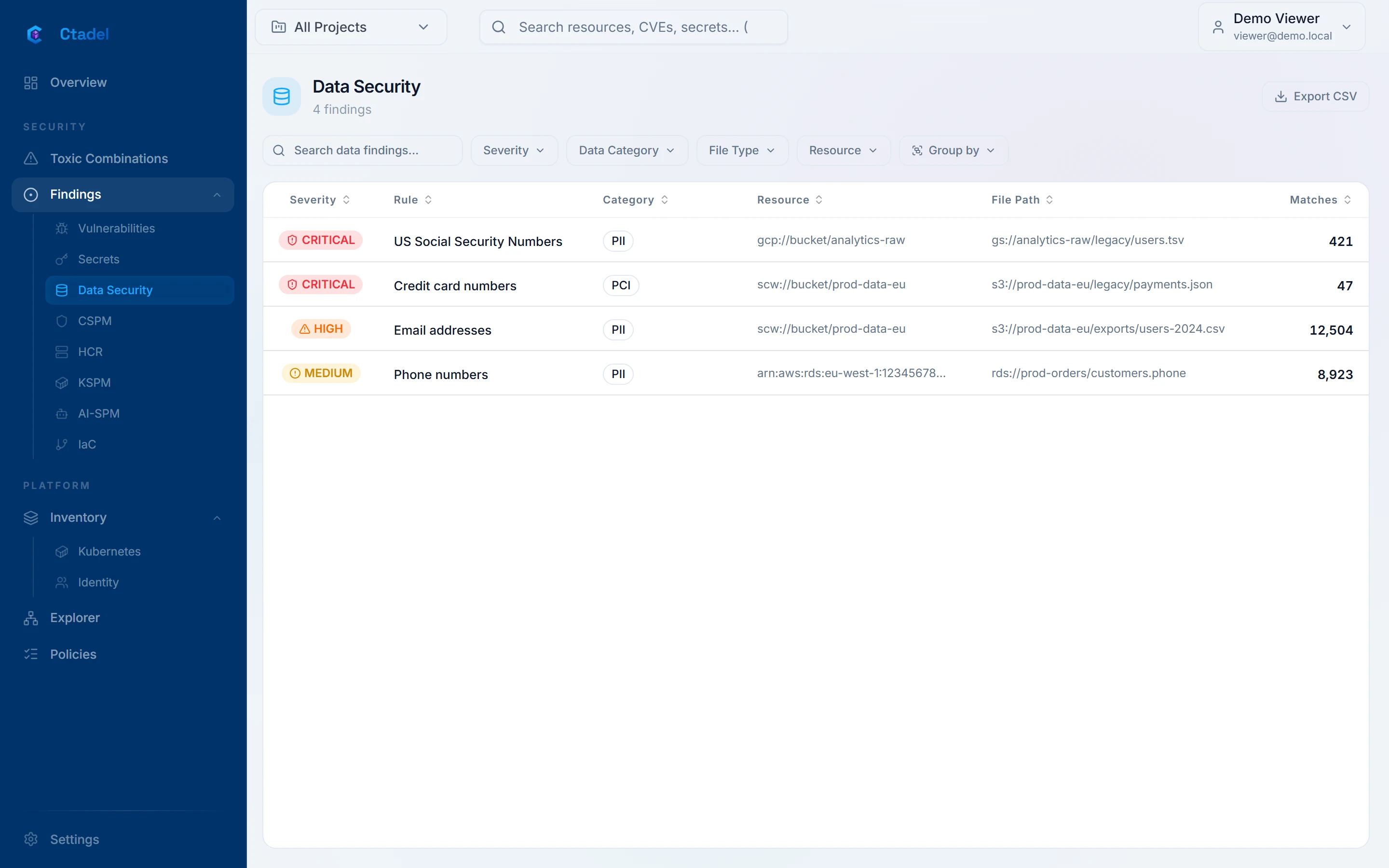
The "Data Security" page (address /dspm) lists the open findings of the active project, sorted by severity then by number of matches, with the columns "Severity", "Rule", "Category", "Resource", "File Path" and "Matches". Filters cover "Severity", "Data Category", "File Type" (the path's extension) and "Resource"; grouping covers "Severity", "Data category" or "Resource". The "Export CSV" button exports the filtered list. The page shows at most 2,000 findings; a notice says when the list is truncated.
Clicking a row opens the detail panel. It shows the rule's description, the "Affected resource", the "Data sample" section with the masked excerpt, the number of matches and the path, and in the right column the "Data classification", the "Category" and the "Matches". Attack paths going through the resource are listed above. The panel is described in Reading a finding.
Limits
- The module recognises formats, not meanings. Sensitive data without a fixed format (a postal address, a name, a free-text diagnosis, a salary) is not detected. The GDPR Article 9 categories are not covered.
- Keyword-anchored rules only find a bare identifier when its label sits next to it: a CSV column header, a SQL column name, a keyword in the text. A file of digits with no header is not reported for those rules.
- In a bucket, only the first 10 MB of a text file are read, and only the first 100,000 objects are listed. Extractable objects over 50 MB are not read. An image-only PDF has no text. Archives beyond three levels or one hundred files are read in part.
- A database is read from a sample of 100 rows per column and 5,000 columns per database; the total shown is an estimate. Numeric, binary and date columns are not read.
- Only PostgreSQL instances on AWS RDS, Google Cloud SQL and Scaleway are copied. Aurora, MySQL, SQL Server, Oracle, MongoDB, Redis, Azure SQL and OVHcloud and OUTSCALE managed databases are not scanned.
- The database copy lives in your account for the duration of the scan and is billed to you; so are the RDS snapshot and the temporary security group. If the connected account lacks the rights to create and delete these objects, no database is scanned.
- On a disk copy, a UTF-16 text file is treated as binary and not read, while it is in a bucket. Files over 256 MB are counted as unread.
- Email addresses are detected without distinguishing internal from external domains.
- The page shows at most 2,000 open findings; the CSV export covers the displayed list.